My Secret Weapon for Staying on Track: Crafting My Own Todo List Website!

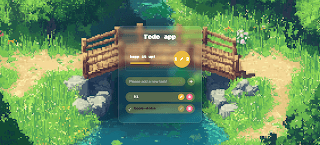
Let's be honest, staying organized can feel like a superpower in today's world. I've tried countless apps, notebooks, and digital sticky notes, but nothing quite clicked. So, I decided to take matters into my own hands and build my very own Todo List website! And I'm really excited to share it because it's become my go-to tool for keeping my day (and my thoughts) in order.
The Inspiration: Learning, Building, and Getting Things Done
I'm always looking for practical projects to sharpen my web development skills. I stumbled upon a fantastic YouTube tutorial from CSSInppets, and it sparked the idea. I thought, "What better way to learn and build something useful than creating a tool I'd actually use every single day?" So, armed with HTML, CSS, and JavaScript, I set out to make my ideal task manager.
It was a fantastic journey of putting theory into practice, really solidifying my understanding of front-end development by building something from scratch.
What I Love About My Todo List (and Why You Might Too!)
I designed this with my own productivity habits in mind, and I think it hits all the right notes:
-
Effortless Task Management: My biggest pet peeve with some apps is how clunky they can be. I made sure it's super intuitive to add, edit, complete, and delete tasks. It's all about getting your ideas down and organized quickly.
-
Tasks That Stick Around: There's nothing worse than closing your browser and realizing you've lost your entire list! That's why I made sure all tasks are saved using localStorage. Your list stays exactly where you left it, even after a refresh or a browser restart. It's a small detail that makes a huge difference.
-
My Visual Motivation Boost: I'm a visual person, so I added a clear visual progress tracker. It's incredibly satisfying to see that bar fill up as I tick off tasks. It's a small nudge that keeps me motivated to push through my to-dos.
-
The Little Joys: Confetti on Completion! When I finally complete all my tasks for the day, a fun confetti animation bursts across the screen! It's a silly little touch, but it really makes those moments of full accomplishment feel celebratory.
-
Works Beautifully Everywhere: I built it to be fully responsive. Whether I'm quickly checking my list on my phone while out, or planning my week on my laptop, the layout adapts perfectly. No more squinting or weirdly-sized elements!
-
A Touch of Modern Style: I'm a big fan of modern design trends, so I incorporated a modern glassmorphism UI. It gives the app a clean, sleek, and almost futuristic look, which makes using it a pleasant experience.
Ready to Streamline Your Day?
This project was a fantastic learning experience for my portfolio, but more importantly, it became a tool I genuinely rely on. If you're curious to see it in action, you can try out the live demo yourself:
👉 Experience My Todo List Website Live!
And for the fellow developers out there, or anyone interested in how it all came together, feel free to dive into the code on GitHub. It's an open book of my learning process:
💻 Check Out the Code on GitHub!
I truly hope it helps you stay as organized and motivated as it helps me! Happy tasking!